Chat with any PDF, right in your browser.
Open a report, paper or contract and ask questions. Answers cite the exact page, so you can check every claim.
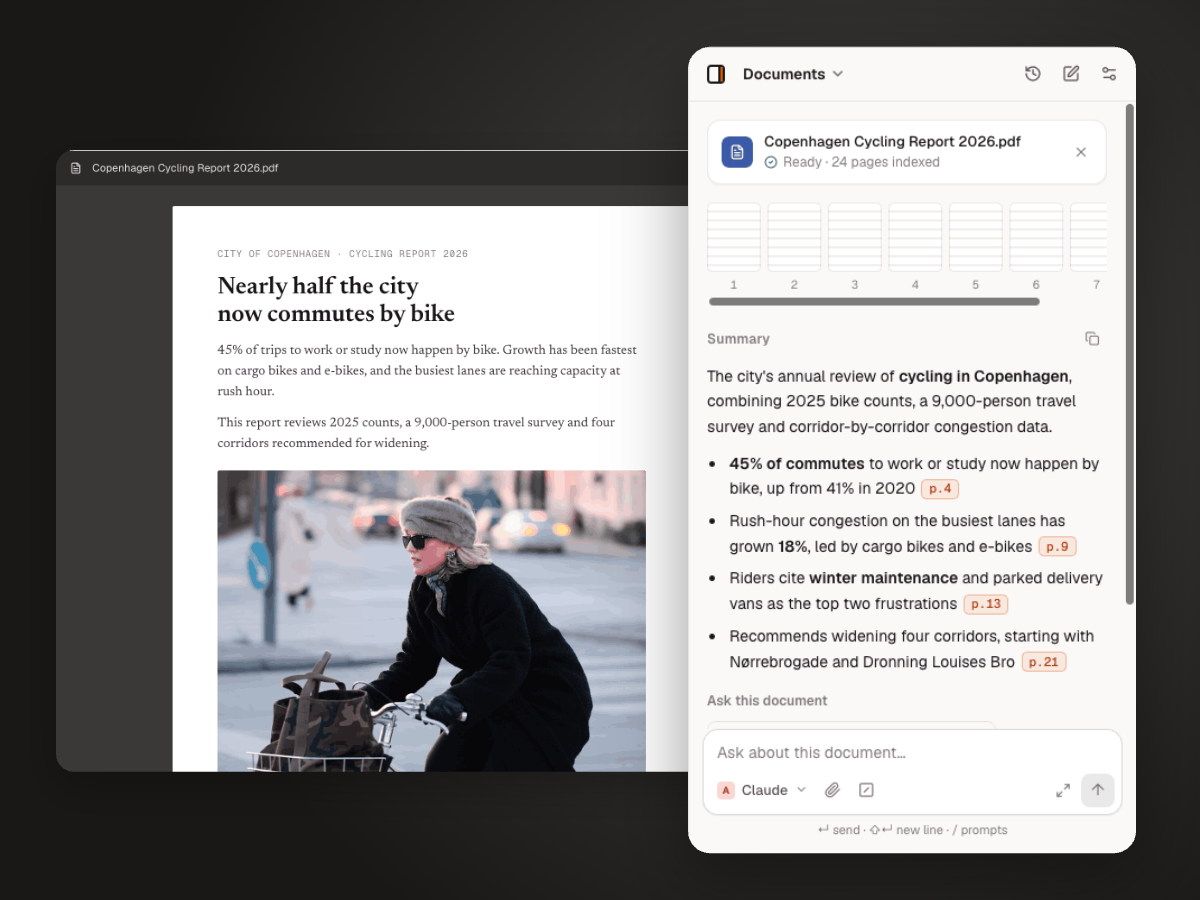
How to chat with a PDF
- 1
Open the PDF
Open it in Chrome, or drop a file into the panel.
- 2
Let it read
Thinkbeside indexes the document in a few seconds — even long ones.
- 3
Ask and verify
Ask anything. Click a page citation to jump to the source.
Built for long documents
Page citations
Every answer links back to the pages it used.
Summaries that hold up
Get the key points first, then dig into any section.
Your choice of model
Use a long-context model for big files, or compare two models’ readings.
Questions
Long reports and papers work well. The limit depends on the model you choose and its context window.
PDFs with selectable text work best. Scanned pages need a model with vision support.
Only the passages needed for your question are sent, and only to the provider you picked. The file itself stays in your browser.
Yes. Ask about methods, results or limitations, and check each answer against the cited page.
More ways to use Thinkbeside
Stop skimming. Start asking your PDFs.
Free to install. Works with the API keys you already have.