Summarize YouTube videos with AI.
Get the summary, key moments and a searchable transcript of any video with captions. Timestamps jump straight to the right second.
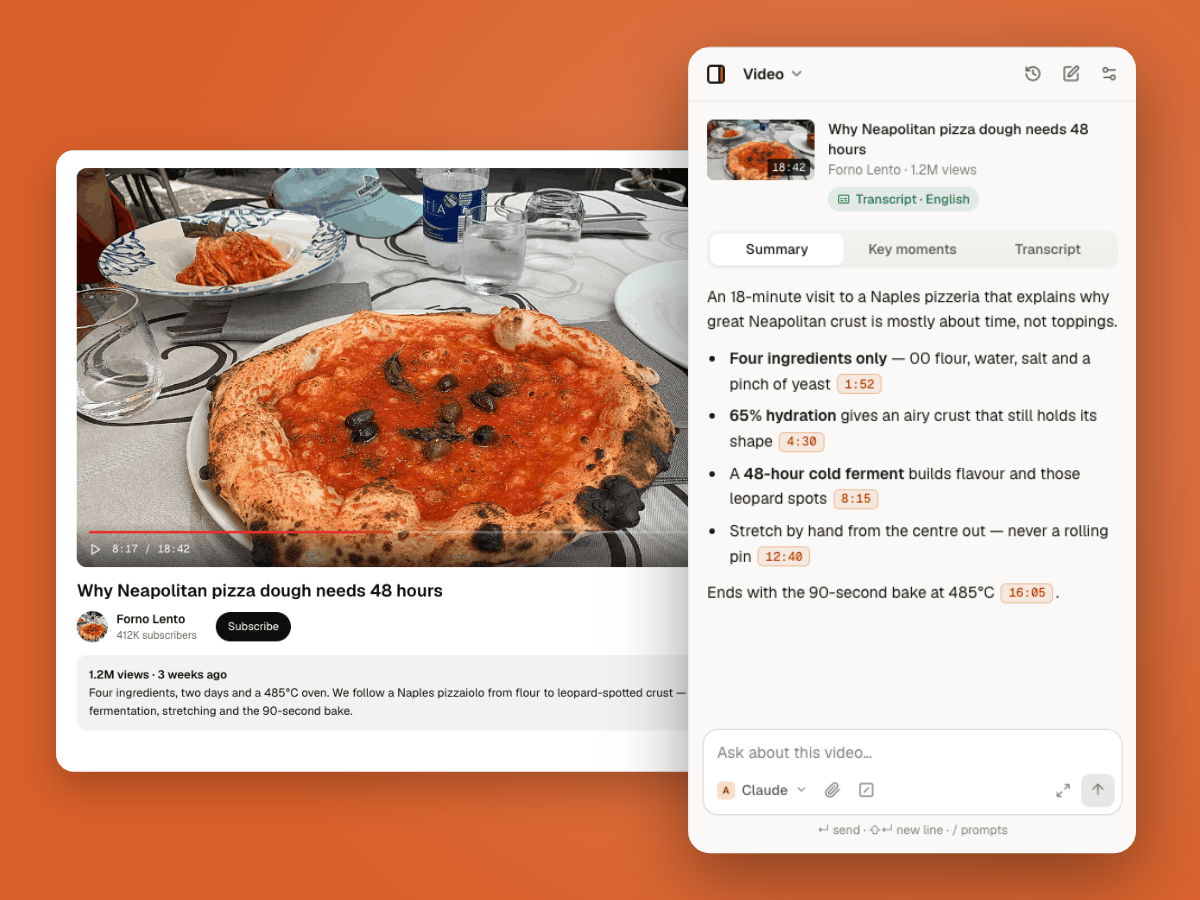
How to summarize a YouTube video
- 1
Open a video
Any YouTube video with captions or a transcript.
- 2
Open the panel
Press Alt+O (⌥O on Mac). The summary and key moments appear on their own.
- 3
Jump or ask
Click a timestamp to skip ahead, or ask about anything in the video.
Watch less, learn the same
Key moments
A chaptered list of what happens, with timestamps.
Searchable transcript
Find the exact line you remember and jump to it.
Ask follow-ups
Ask the video questions as if you’d watched it twice.
Questions
It works on videos with captions or an available transcript, which covers most of YouTube.
Any language the video’s transcript is in. You can ask for the summary in a different language.
Yes. For multi-hour videos, pick a long-context model.
No. It works on any video you can watch.
More ways to use Thinkbeside
Get the point of any video in seconds.
Free to install. Works with the API keys you already have.